

Search
Search for a symbol or emoji...
N-Ary Intersection Symbol ⋂
N-Ary Intersection Symbol Information
| Symbol Name | N-Ary Intersection |
| Unicode Version | 1.1 (June 1993) |
| Unicode | U+22C2 |
| CSS Code | \22C2 |
| HTML Entity | ⋂ |
| Hex Code | ⋂ |
| HTML Code | ⋂ |
| Latex | \bigcap |
| Symbol | ⋂ |
N-Ary Intersection Symbol Encoding
| UTF-8 | 0xE2 0x8B 0x82 |
| UTF-16 | 0x22C2 |
| UTF-32 | 0x000022C2 |

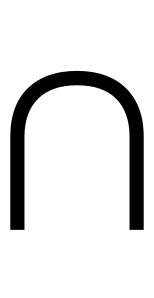
N-Ary Intersection Symbol in Latex
N-Ary Intersection
1\documentclass{article}
2\usepackage{amssymb}
3\begin{document}
4\bigcap
5\end{document}
How to add n-ary intersection symbol via keyboard on different Operating systems
You can type the n-ary intersection symbol on most modern devices with the help of following methods:
How to type n-ary intersection symbol on Microsoft Word
You can type the n-ary intersection in Microsoft Word using steps mentioned below:
- Place your cursor in the text area where you need to insert the symbol and type 22C2
- Without moving the cursor press keys Alt + x together
- The original 22C2 is now transformed into ⋂
How to type n-ary intersection symbol on Microsoft Windows
You can type the n-ary intersection on Microsoft windows using following steps:
- Hold Alt and press to type n-ary intersection on your windows machine.
How to type n-ary intersection symbol on Mac OS
You can type the n-ary intersection on Mac OS using following steps:
- Place your cursor in the text area where you need to insert the symbol
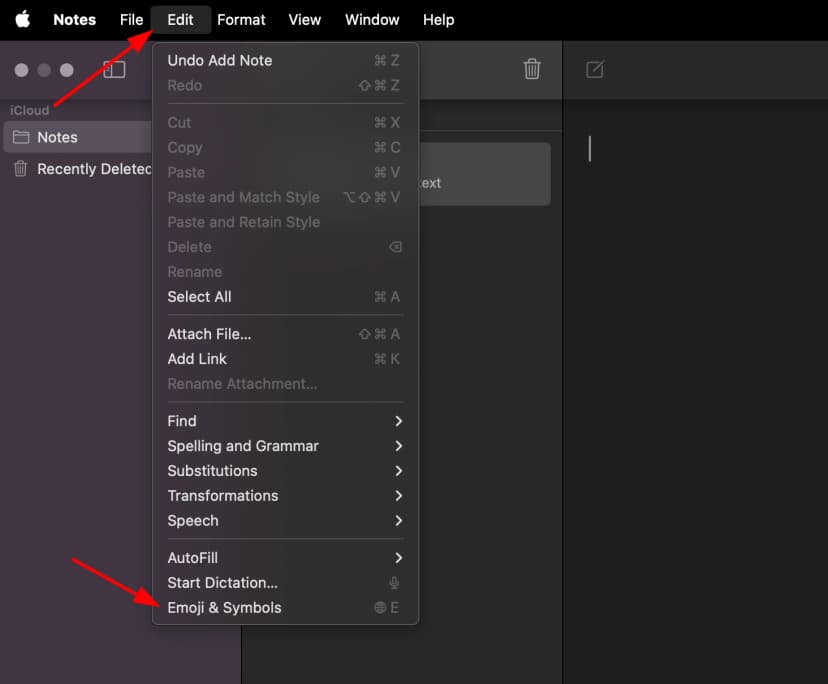
- Press Ctrl + ⌘ Command + ⎵ Space to bring up the Character Viewer. Alternatively, choose Edit ⇒ Emoji & Symbols
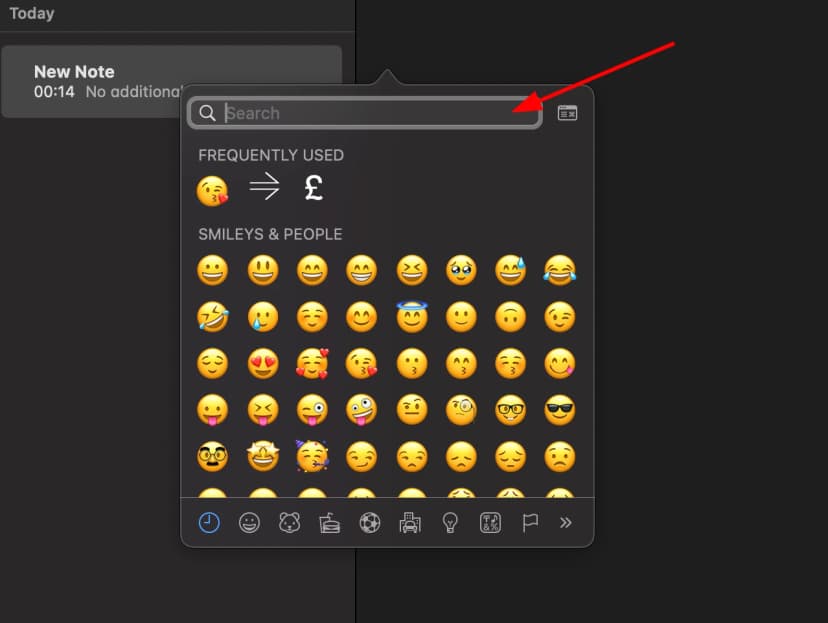
- Type "N-Ary Intersection" in the search field at the top and press Enter
- The symbol should appear. Click on it to insert it into your text
How to type n-ary intersection symbol on Linux
You can type the n-ary intersection on Linux using following steps:
- Place your cursor in the text area where you need to insert the symbol
- Hold ⇧ Shift + Ctrl and press the letter + U
- Press keys 22C2 consecutively
- And then press ↵ Enter , the desired symbol will be added to your document
How to type n-ary intersection symbol on IOS and Android
The easiest way to type the n-ary intersection symbol on ios and android is to copy and paste it wherever you need it.
How to use n-ary intersection in CSS
//CSS Example
1span {
2    content: \22C2;
3  }
How to use n-ary intersection in HTML
//HTML Example
1<span>⋂</span>N-Ary Intersection symbol representation in programming languages
N-Ary Intersectionsymbol's representation in different programming languages can be found in table below:
| Language | Representation |
|---|---|
| Rust | \u{22C2} |
| Ruby | \u{22C2} |
| Python | \u22C2 |
| PHP | \u{22C2} |
| Perl | \x{22C2} |
| Java | \u22C2 |
| Modern JavaScript - Since ES6 | \u{22C2} |
| JavaScript | \u22C2 |
| Go | \u22C2 |
| C# | \u22C2 |
| C and C++ | \u22C2 |
| Bash and Zsh - inside echo -e | \u22C2 |
| RFC 5137 | \u'22C2' |