
Search

Search for a symbol or emoji...

Thorn Symbol Þ

The Thorn symbol, represented by the character Þ (uppercase) or þ (lowercase), has a rich history rooted in Old English and Norse languages. Often associated with the unvoiced dental fricative sound (/θ/), the Thorn symbol played a significant role in medieval manuscripts and continues to hold linguistic and historical importance. In this article, we'll explore the origins, evolution, and usage of the Thorn symbol.

Origins and Historical Significance

The Thorn symbol has its origins in runic alphabets and was later adapted into medieval Latin scripts. It represents the unvoiced dental fricative sound, similar to the "th" sound in the English word "think." In Old English, Thorn was used alongside the Eth symbol (Ð) to distinguish between the voiced and unvoiced "th" sounds.

Linguistic Applications

The Thorn symbol was primarily used in Old English and Old Norse, and it holds linguistic significance in the following ways:

  • Old English: In Old English manuscripts, Thorn was used to represent the unvoiced "th" sound. Words like "þunor" (thunder) and "þe" (the) featured the Thorn symbol.
  • Old Norse/Icelandic: Thorn is part of the Icelandic alphabet and is used in words such as "þjóð" (people) and "þorn" (thorn).

Transition to Middle English

With the transition from Old English to Middle English, the use of the Thorn symbol diminished. This shift was influenced by changes in scribal practices and the introduction of the printing press. As a result, the Thorn symbol was gradually replaced by the letter "y" in Middle English manuscripts.

Representation in Modern Computing

While the Thorn symbol is not commonly found on modern English keyboards, it can be represented using character encoding standards like Unicode (U+00DE for uppercase Þ and U+00FE for lowercase þ). Some word processors and character maps also provide access to the Thorn symbol.

Cultural and Historical References

The Thorn symbol has left its mark on cultural and historical artifacts:

  • Medieval Manuscripts: Thorn is prevalent in medieval manuscripts, offering insights into the linguistic practices of the time.
  • Language Evolution: The transition from Old English to Middle English marked a shift in the use of characters, with Thorn gradually giving way to other representations of the "th" sound.

The Thorn symbol, with its unique shape and linguistic significance, stands as a testament to the intricate history of written language. While its use has diminished over time, Thorn remains a fascinating character that provides a window into the linguistic richness of Old English and Old Norse manuscripts.

Thorn Symbol Information

Symbol Name
Thorn
Unicode Version
1.1 (June 1993)
Unicode
U+00DE
CSS Code
\00DE
HTML Entity
Þ
Hex Code
Þ
HTML Code
Þ
Latex
\TH
Symbol
Þ

Thorn Symbol Encoding

UTF-8
0xC3 0x9E
UTF-16
0x00DE
UTF-32
0x000000DE

ThornSymbol's PNG and SVG files

How to add thorn symbol via keyboard on different Operating systems

You can type the thorn symbol on most modern devices with the help of following methods:

How to type thorn symbol on Microsoft Word

You can type the thorn in Microsoft Word using steps mentioned below:

  • Place your cursor in the text area where you need to insert the symbol and type 00DE
  • Without moving the cursor press keys Alt + x together
  • The original 00DE is now transformed into Þ

How to type thorn symbol on Microsoft Windows

You can type the thorn on Microsoft windows using following steps:

  • Hold Alt and press to type thorn on your windows machine.

How to type thorn symbol on Mac OS

You can type the thorn on Mac OS using following steps:

  • Place your cursor in the text area where you need to insert the symbol
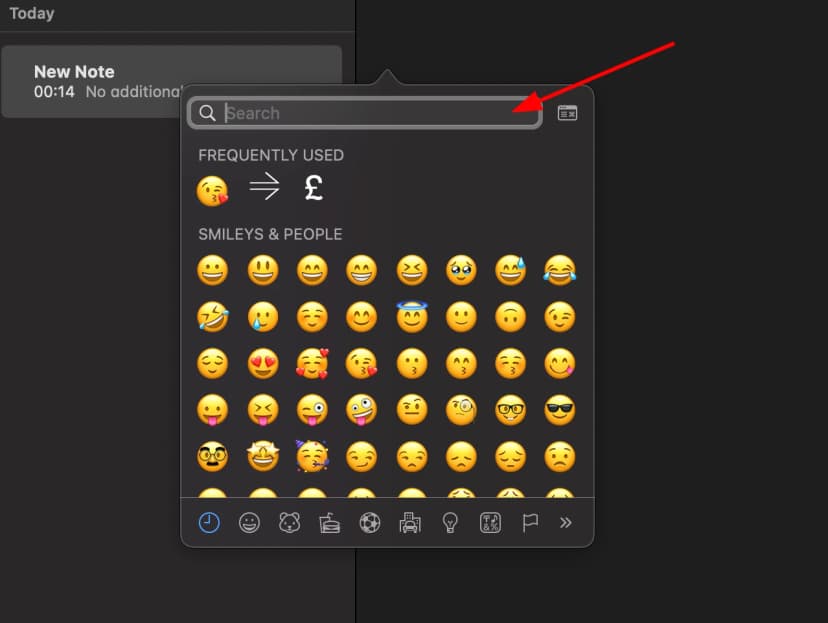
  • Press Ctrl + ⌘ Command + ⎵ Space to bring up the Character Viewer. Alternatively, choose Edit ⇒ Emoji & Symbols
  • Type "Thorn" in the search field at the top and press Enter
  • The symbol should appear. Click on it to insert it into your text
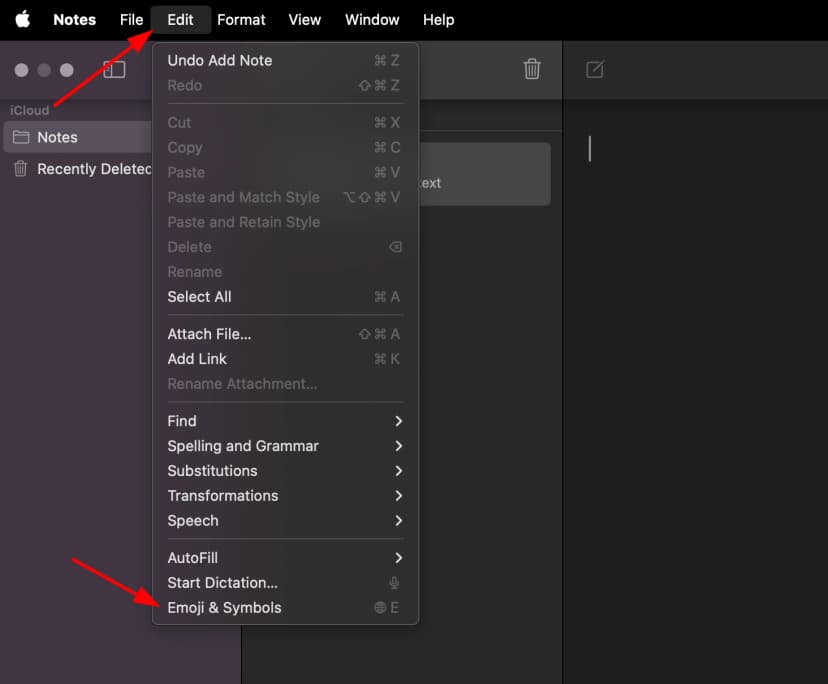
Mac OS Character Viewer

How to type thorn symbol on Linux

You can type the thorn on Linux using following steps:

  • Place your cursor in the text area where you need to insert the symbol
  • Hold ⇧ Shift + Ctrl and press the letter + U
  • Press keys 00DE consecutively
  • And then press ↵ Enter , the desired symbol will be added to your document

How to type thorn symbol on IOS and Android

The easiest way to type the thorn symbol on ios and android is to copy and paste it wherever you need it.

How to use thorn in CSS

//CSS Example
1span { 2 content: \00DE; 3 }

How to use thorn in HTML

//HTML Example
1<span>&#222;</span>

Thorn symbol representation in programming languages

Thornsymbol's representation in different programming languages can be found in table below:

LanguageRepresentation
Rust
\u{DE}
Ruby
\u{DE}
Python
\u00DE
PHP
\u{DE}
Perl
\x{DE}
Java
\u00DE
Modern JavaScript - Since ES6
\u{DE}
JavaScript
\u00DE
Go
\u00DE
C#
\u00DE
C and C++
\u00DE
Bash and Zsh - inside echo -e
\u00DE
RFC 5137
\u'00DE'