

Search
Search for a symbol or emoji...
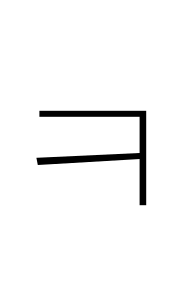
Hangul Letter Khieukh Symbol ㅋ
Hangul Letter Khieukh Symbol Information
| Symbol Name | Hangul Letter Khieukh |
| Unicode Version | 1.1 (June 1993) |
| Unicode | U+314B |
| CSS Code | \314B |
| Hex Code | ㅋ |
| HTML Code | ㅋ |
| Symbol | ㅋ |
Hangul Letter Khieukh Symbol Encoding
| UTF-8 | 0xE3 0x85 0x8B |
| UTF-16 | 0x314B |
| UTF-32 | 0x0000314B |

How to add hangul letter khieukh symbol via keyboard on different Operating systems
You can type the hangul letter khieukh symbol on most modern devices with the help of following methods:
How to type hangul letter khieukh symbol on Microsoft Word
You can type the hangul letter khieukh in Microsoft Word using steps mentioned below:
- Place your cursor in the text area where you need to insert the symbol and type 314B
- Without moving the cursor press keys Alt + x together
- The original 314B is now transformed into ㅋ
How to type hangul letter khieukh symbol on Microsoft Windows
You can type the hangul letter khieukh on Microsoft windows using following steps:
- Hold Alt and press to type hangul letter khieukh on your windows machine.
How to type hangul letter khieukh symbol on Mac OS
You can type the hangul letter khieukh on Mac OS using following steps:
- Place your cursor in the text area where you need to insert the symbol
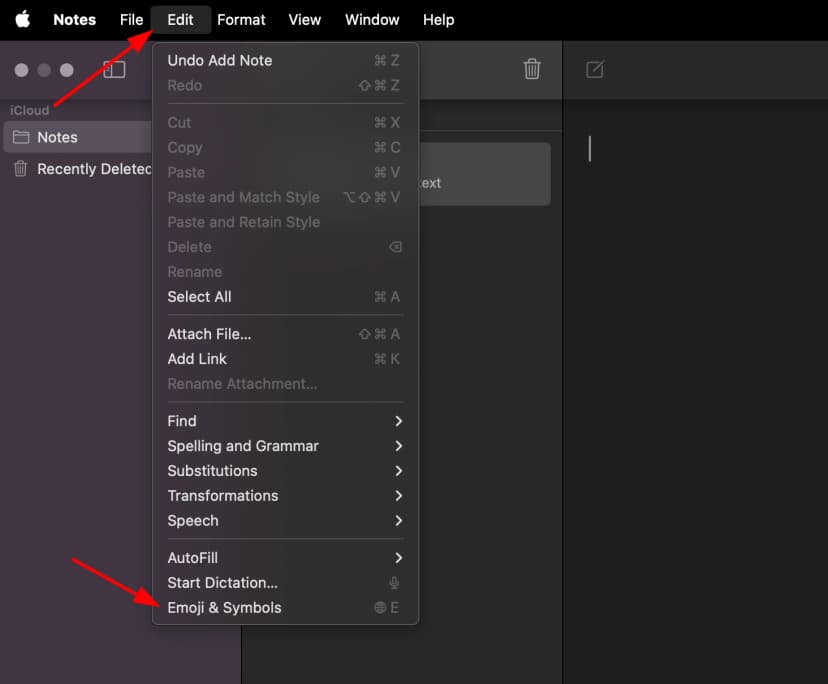
- Press Ctrl + ⌘ Command + ⎵ Space to bring up the Character Viewer. Alternatively, choose Edit ⇒ Emoji & Symbols
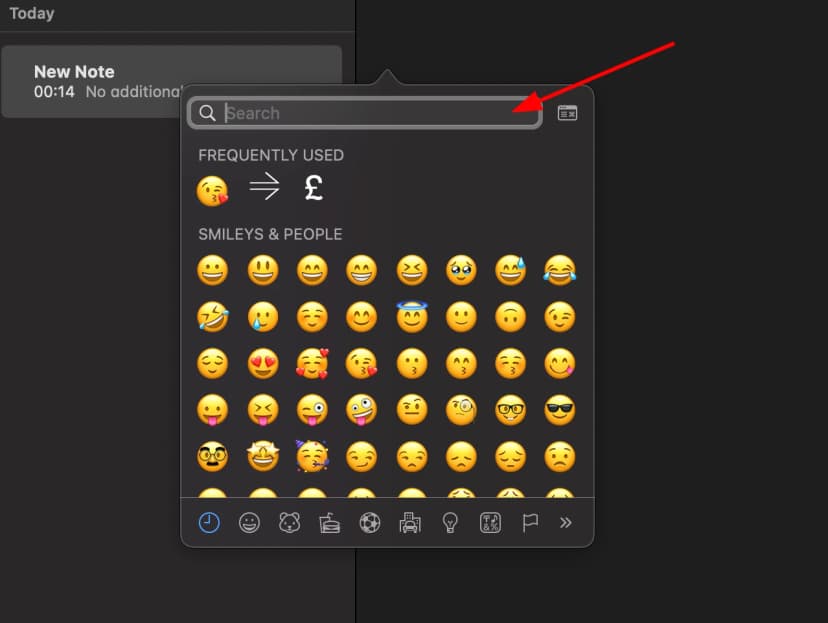
- Type "Hangul Letter Khieukh" in the search field at the top and press Enter
- The symbol should appear. Click on it to insert it into your text
How to type hangul letter khieukh symbol on Linux
You can type the hangul letter khieukh on Linux using following steps:
- Place your cursor in the text area where you need to insert the symbol
- Hold ⇧ Shift + Ctrl and press the letter + U
- Press keys 314B consecutively
- And then press ↵ Enter , the desired symbol will be added to your document
How to type hangul letter khieukh symbol on IOS and Android
The easiest way to type the hangul letter khieukh symbol on ios and android is to copy and paste it wherever you need it.
How to use hangul letter khieukh in CSS
//CSS Example
1span {
2    content: \314B;
3  }
How to use hangul letter khieukh in HTML
//HTML Example
1<span>ㅋ</span>Hangul Letter Khieukh symbol representation in programming languages
Hangul Letter Khieukhsymbol's representation in different programming languages can be found in table below:
| Language | Representation |
|---|---|
| Rust | \u{314B} |
| Ruby | \u{314B} |
| Python | \u314B |
| PHP | \u{314B} |
| Perl | \x{314B} |
| Java | \u314B |
| Modern JavaScript - Since ES6 | \u{314B} |
| JavaScript | \u314B |
| Go | \u314B |
| C# | \u314B |
| C and C++ | \u314B |
| Bash and Zsh - inside echo -e | \u314B |
| RFC 5137 | \u'314B' |